
Wake LED on touch — 3 Switch + 1 Dimmer
- Stuck on this step? WhatsApp us a photo
Open the device settings
On the Dashboard, tap ⋮ on your device, then tap Device Settings and Settings.
- Stuck on this step? WhatsApp us a photo
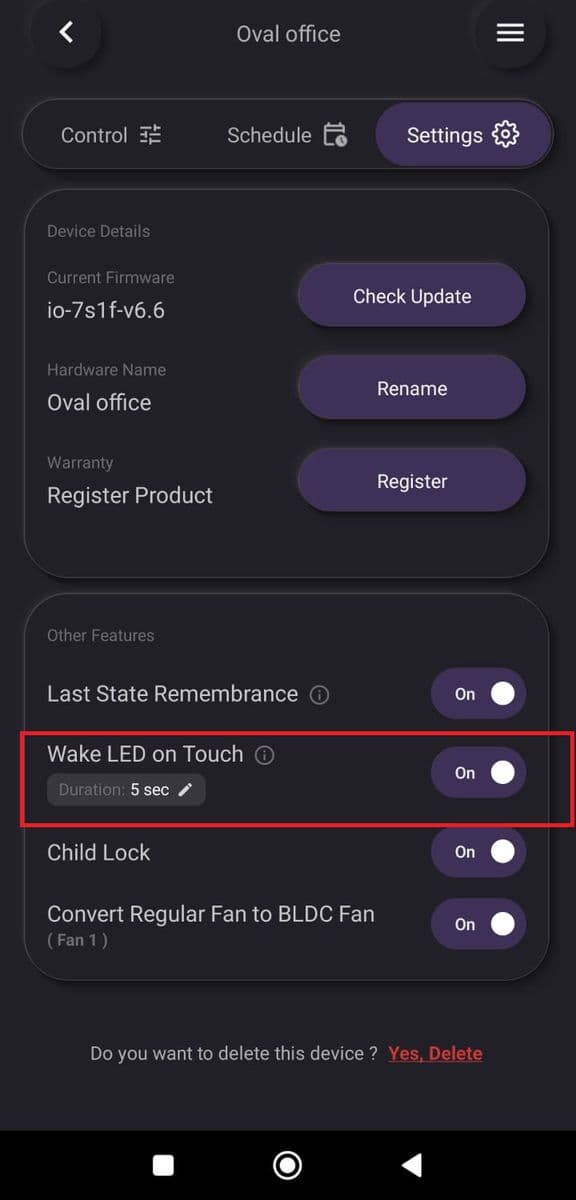
Turn Wake LED on Touch on or off
Use the Wake LED on Touch slider and set how long the lights stay on.
- Stuck on this step? WhatsApp us a photo
Or use the remote
Press and hold Button 3 on the remote for 10 seconds to turn Wake LED on Touch on or off.
