
Install the module — In-wall 4 Switch
Before you start
- Switch off the main power at the MCB and check the phase is off with a tester. Keep it off until you finish.
- Have a qualified electrician install it. You need a flat-head screwdriver, a tester and insulation tape.
- It fits behind your switchboard in a 4M, 6M, 8M, 12M or 16M metal box. Neutral is needed.
- Light outputs (L): up to 6A resistive each. One light per output, never in series or parallel. LED/CFL: max 40W.
- LED strips: 240V mains strips only, never 12V or 24V. High load (H): up to 16A resistive.
- Stuck on this step? WhatsApp us a photo
Switch off the power
Switch off the house MCB. Check with a tester that the phase is completely off before you start.
- Stuck on this step? WhatsApp us a photo
Find your wires
In the switch box, find the phase (live), the neutral, the wires to your lights, and the wires from your wall switches.
- Stuck on this step? WhatsApp us a photo
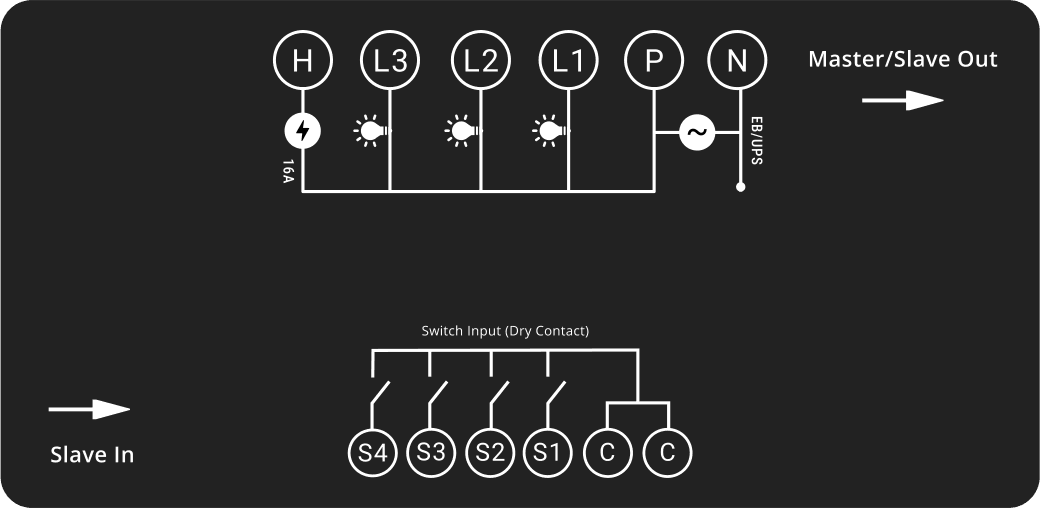
Connect phase and neutral
Follow the wiring drawing. Connect the incoming phase (live) to P and the neutral to N. Tighten the screws firmly.
P takes the EB or UPS phase. The module needs a proper neutral connection to work.
- Stuck on this step? WhatsApp us a photo
Connect your lights and appliances
Connect the wires of loads 1, 2 and 3 to L1, L2 and L3. Connect your high-power appliance to H.
P powers L1, L2, L3 and H. L takes up to 6A each, H up to 16A.
- Stuck on this step? WhatsApp us a photo
Connect your wall switches
Wire each wall switch between C and its own S terminal: switch 1 to S1, switch 2 to S2, and so on to S4.
Never connect AC power to C or S. With an expansion module, keep each module's C terminal separate.
- Stuck on this step? WhatsApp us a photo
Check every connection
Check for loose strands. Phase goes only to P, neutral only to N, and each load and wall switch to its own terminal.
- Stuck on this step? WhatsApp us a photo
Place the module in the box
Arrange the wires neatly and place the module in the switch box. Make sure nothing presses on the terminals or wires.
- Stuck on this step? WhatsApp us a photo
Switch on and test
Switch the MCB back on. Test each wall switch, then test control from the iotics app.
